3.3 简单算法及其程序实现 知识点题库
-
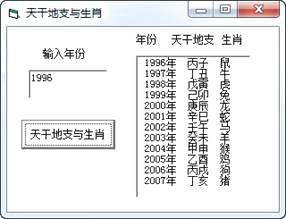
(1) 代码“Private Sub Command1_Click()”中的Click是 。(单选,填字母)A . 对象名 B . 属性名 C . 事件名
-
(2) 为实现上述功能,请在划线处填入合适的代码。
Private Sub Command1_Click()
Dim a As Integer, b As Integer
Dim i As Integer, n As Integer
Dim c1 As String, s1 As String
Dim c2 As String, s2 As String
Dim c3 As String, s3 As String
List1.Clear
s1 = "甲乙丙丁戊己庚辛壬癸"
s2 = "子丑寅卯辰巳午未申酉戌亥"
s3 = "鼠牛虎兔龙蛇马羊猴鸡狗猪"
n = Val(Text1.Text)
For i = n To
a = (i + 6) Mod 10
b = (i + 8) Mod 12
c1 = Mid(s1, a + 1, 1)
c2 = Mid(s2, b + 1, 1)
c3 = Mid(s3, b + 1, 1)
List1.AddItem + "年" + c1 + c2 + " " + c3
Next i
End Sub
-
(3) 由上述算法可知,2024年对应的“天干地支”为。

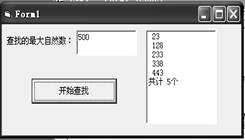
程序代码如下:
Private Sub Command1_Click()
Dim sum As Integer 'sum用来统计符合条件的自然数个数
Dim n, max As Integer
List1.Clear
sum = 0
max = _______①______ '指定查找范围的最大自然数,在text1框中输入
n = 0
Do While n <= max
n = n + 1
If _______ _② ___ Then
List1.AddItem Str(n) '
________③_______
End If
Loop
List1.AddItem ("共计" + Str(sum) + "个")
End Sub
-
(1) 解决该问题所用到的是(填解析算法/枚举算法)。
-
(2) 程序中①划线处应填入。
-
(3) 程序中②划线处应填入。
-
(4) 程序中③划线处应填入。
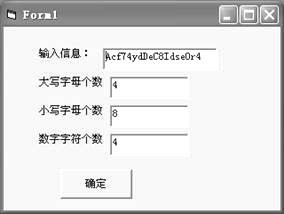
Private Sub Command1_Click()
Dim getStr As String
Dim a As String
Dim i As Integer,s As Integer
Dim q As Integer,l As Integer
s=0:q=0:l=0
getStr=Text1.Text
For i = 1 To ① ’对字符串中所有字符逐一判断
a = ②
If a >= "a" And a <= "z" Then s = s + 1
If a >= "A" And a <= "Z" Then q = q + 1
If a >= "0" And a <= "9" Then l = l + 1
Next i
Text2.Text = Str(s)
Text3.Text = Str(q)
Text4.Text = Str(l)
End Sub
-
(1) 虚线框中的代码属于(选填:枚举/解析)算法
-
(2) 划线①处应填入的语句为:
划线②处应填入的语句为:
-
(3) 运行该程序时,如果在文本框Text1中输入的字符串中包含其他符号,如“?”、“*”,
则 (选填 会/不会)影响输出结果。
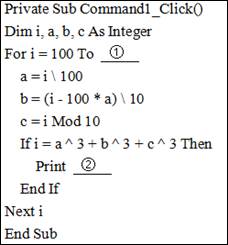
153=1×1×1+5×5×5+3×3×3
小张设计了一个算法来输出所有的水仙花数,具体程序如下。
-
(1) 在程序中常见用于解决问题的方法有解析法、穷举法、递归法等,本题中使用了哪种方法?
-
(2) 程序中定义了几个变量?
-
(3) 将程序中①的代码补充完整。
-
(4) 将程序中②的代码补充完整。
-
(5) 在for循环结构中,循环体执行的次数是多少?
-
(6) 在本题中变量c主要用来存放这个三位数中的百位、十位还是个位上的数?
⑴将n乘以3后加1产生一个新的数
⑵对产生的新数循环执行如下操作:新数是偶数时,用新数除以2;新数是奇数时,用新数乘以3后加1
譬如,以2为初始值,则计算过程如下。2→7→22→11→34→17→52→26→13→40→20→10→5→16→8→4→2。数字2不能在10步之内回到初始值。
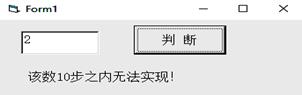
界面如图所示,回答下列问题:
-
(1) 若要把窗体的标题名称由“Form1”改为“数值猜想”,应改变窗体的属性。
-
(2) 完成上述功能的程序代码如下,请在划线处填入合适的代码
Private Sub Command1_Click()
Dim n As Integer,t as Integer ,m as Integer ,s as String
t = n * 3 + 1
m = 1
s = ""
Do While
s = s + Str(t)
If t Mod 2 = 0 Then
t = t \ 2
Else
t = t * 3 + 1
End If
m = m + 1
Loop
If n = t Then
Label1.Caption = s + Str(n)
Else
Label1.Caption = "该数10步之内无法实现!"
End If
End Sub
-
(3) 按照以上VB程序的计算方法,若在文本框Text1中输入4,能否在10步之内回到初始数 。(选填:能/否)
Private Sub Command1_Click()
Dim i As Integer, m As Integer, n As Integer
Label1.Caption = "1000以内的完全数如下:"
For i = 1 To 1000
n = 0
For m = 1 To i \ 2
If i Mod m = 0 Then n = n + m
Next
If n = i Then Label2.Caption = Label2.Caption & "" & Str(i)
Next
End Sub
该过程采用的算法是( )
For i = 100 To 999 lag = True: j = 2
Do While j < i And flag
Loop
If flag Then List1.AddItem Str(i) Next i
方框中的代码由以下四部分组成:①End If ②If i Mod j = 0 Then ③j = j + 1
④flag = False。代码顺序正确的是( )
编写一个验证哥德巴赫猜想的VB程序:程序运行时,在文本框Text1中输入一个大于或等于4的偶数,单击“验证”按钮Command1后,如果哥德巴赫猜想验证成功,则在文本框Text2中显示“Yes”,并在列表框List1中显示用两个素数表示该偶数的等式,否则显示“No”。程序运行效果如图所示。
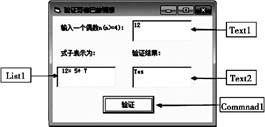
实现上述功能的VB代码如下,但加框处代码有错,请改正。
Function judge(x As Integer)As Boolean
‘函数judge的功能是判断整数x是不是素数,若是素数则返回True,否则返回False
Dim j As Integer
judge=True
j=2
Do While j<=x-1 And judge=True
If x Mod j=0 Then
judge=False
Else
j=j+1
End If
Loop
End Function
Private Sub Command1_Click()
Dim n As Integer, p As Integer, q As Integer, flag As Boolean
n=Val(Text1.Text)
p=1
flag=False
Do While  And p<n ‘
p=p+1
 ‘
‘
If judge(p)And judge(q)Then
Text2.Text=“Yes”
flag=True
List1.AddItem Str(n)+“=”+Str(p)+“+”+Str(q)
End If
Loop
If flag=False Then
Text2.Text=“No”
End Sub
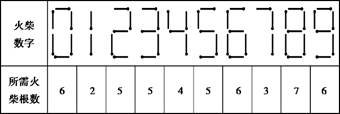
注意:⑴其中A+B=C 等式中的“+”“=”需要用去4根火柴。
⑵0+4=4与4+0=4算作一种方案。
例如n=18,符合条件的算式共有5个:0+4=4,0+11=11,1+10=11,2+2=4,2+7=9。
小明设计了一个程序,在Text1中输入火柴数量,单击“计算”按钮,在Label1中输出总的可行方案数,并在List1中输出所有可行的算式。
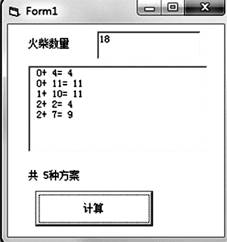
程序代码如下,加框处代码有误,请修改。
Dim s(0 To 9) As Integer
Private Sub Command1_Click()
Dim n As Integer, a As Integer, b As Integer, count As Integer
count=0
n=Val(Text1.Text)
For a=0 To 999 Step 1
For b=a To 999 Step 1
If  Then '①
List1.AddItem Str(a)+"+"+Str(b)+"="+Str(a+b)
count=count+1
End If
Next b
Next a
Label2.Caption="共"+Str(count)+"种方案"
End Sub
Function gs(ByVal x As Integer) As Integer
Dim tmp As Integer
tmp=0
If x=0 Then tmp=s(0)
Do While x > 0
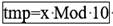 '②
'②
x=x \ 10
Loop
gs=tmp
End Function
Private Sub Form_Load()
s(0)=6: s(1)=2: s(2)=5: s(3)=5: s(4)=4
s(5)=5: s(6)=6: s(7)=3: s(8)=7: s(9)=6
End Sub
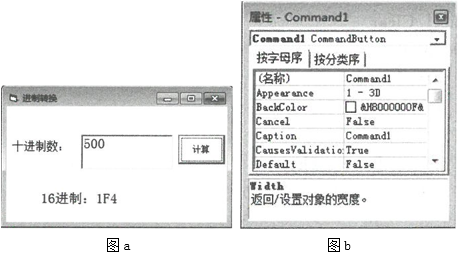
-
(1) 要使命令按钮上显示的“计算”改为“转换”,可在其属性窗口(图b)中将属性的属性值修改为“转换”。
-
(2) 实现上述功能的VB程序如下,请在画线处填入合适的代码。
Private Sub Command1_Click( )
Dim ch As String
Dim n As Integer, x As Integer
Dim ans As String
ch="0123456789ABCDEF"
n= ①
Do While n>0
x=n Mod 16
②
ans= ③
Loop
Label2.Caption="16进制:"+ans
End Sub
画线处应填入的代码为:①;②;③。
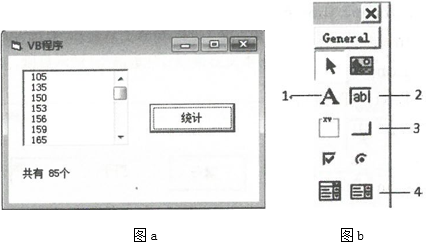
-
(1) 在设计程序界面时,应使用图b所示的“控件工具箱”中的(填写相应编号)添加“List1”列表框。
-
(2) 实现上述功能的VB程序如下,请在画线处填入合适的代码。
Private Sub Command1_Click()
Dims As Integer,n As Integer
Dim a As Integer,b As Integer,c As Integer
n=0
s=102
List1.Clear
Do Whiles<=999
a= ①
b=s\10 Mod 10
c=s Mod 10
If ② Then
List1.Addltem Str(s)
③
End If
s=s+3
Loop
Label1.Caption="共有"+Str(n)+"个"
End Sub
画线处应填入的代码为:①;②;③。
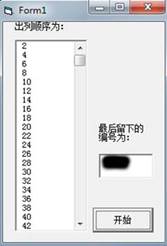
例如以6个同学编号为例,按1至2报数(从1号位置开始)依次出列的编号次序为2-4-6-3-1-5,那么最后剩下的就是编号为5的同学。
为了解决这个问题,小李用VB编写了如下程序尝试解决,其中列表list1显示出列的顺序编号,文本框text1中显示最后留下的编号,程序代码如下(测试界面如下图):
Private Sub Command1_Click()
Dim s, f, t As Integer
Dim a(1 To 400) As Boolean
For i = 1 To 400
a(i) = False
Next i
s = 0
f = 0
i = 0
Do While f < 399
i = i + 1
If i = 401 Then i =
If a(i) = False Then s = s + 1
If s = 2 Then
List1.AddItem Str(i)
a(i) = True
f =
End If
Loop
For i = 1 To 400
If Then text1.text=str(i)
Next i
End Sub
在程序划线处填入合适的代码。
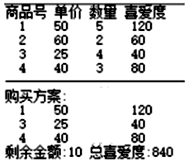
按上述要求,编写VB程序,功能如下:在文本框Text1中输入预计礼物数,在文本框 Text2中输入总金额,单击“计算”按钮Command1,在列表框List1中显示各类商品的编号、单价、数量、喜爱度,以及最佳购买方案、剩余金额和总喜爱度,若有多种最佳方案,则输出第一个找到的方案信息,如图a所示。
|
图a |

-
(1) 请在划线处填入合适的代码。
Const m = 4 '有 m 种商品
Dim sph(1 To m) As String '商品号
Dim dj(1 To m) As Single '单价
Dim sl(1 To m) As Integer '数量
Dim xa(1 To m) As Integer '喜爱度
Dim hh(1 To m * 10) As Integer '每件商品对应的货号
Dim p As Integer,n As Integer,nc As Integer 'p个朋友,n元钱,共nc件商品
Dim zxa As Integer '总喜爱度为每件购买商品的喜爱度*购买数量的总和
Private Sub Form_Load()
'各商品的商品号、单价、数量、喜爱度分别存入数组 sph、dj、sl 和 xa 并输出,代码略
End Sub
Private Sub Command1_Click()
Dim goumai(1 To m * 10) As Integer
Dim i As Double,j As Integer,k As Integer,t As Integer
Dim fs As Integer,je As Integer,maxi as Integer,maxje As Integer,maxzxa As Integer
p = Val(Text1.Text): n = Val(Text2.Text)
nc = 0
For i =1 To m
For j =1 To sl(i)
nc = nc + 1: ①
Next j
Next i
For i =0 To 2^ nc - 1
t = i
For j =1 To nc
goumai(j) =②
t = t \ 2
Next j
fs = 0: je = 0: zxa =0 '初始化份数,金额,总喜爱度
For j =1To nc
fs = fs + goumai(j): je = je + dj(hh(j)) * goumai(j): zxa = zxa + xa(hh(j)) * goumai(j)
Next j
If fs = p And ③ Then maxi = i: maxje = je: maxzxa = zxa
Next i
'输出maxi对应的购买方案,代码略
If maxje >0 Then List1.AddItem "剩余金额:" & CStr(n - maxje) & " 总喜爱度:" & CStr(maxzxa)
Else
List1.AddItem "钱太少"
End if
End Sub
-
(2) 根据题意,现有4种商品对应的信息如图b所示,若预算总金额为400元,预计购买10件礼物,则图中购买方案中三种商品的购买数量分别为(填数字,中间用逗号分隔)。
图b
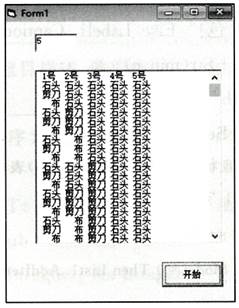
程序代码如下。
Dims(2) AsString, res AsString
Dim i AsInteger, p AsInteger
PrivateSub Command1_ Click()
s(0)="石头" : s(1)="剪刀" : s(2)="布"
n= Va1(Text1. Text)
For i=1 To n
res= res+Str(i)+"号"+”"
Next i
List1. AddItem res
For i=0 To ①
p=1 : res =" "
For j=1 To n
res= res+" "+ ②
p=p\ 3
Next j
List1. AddItem res
Next i
EndSub
-
(1) 若5个人进行游戏,则总方案数为。
-
(2) 请完成程序中的填空。
① ②
import math
h = 500
g = 9.8
t = math.sqrt(2*h/g)
hx = g*(t-1)*(-1)/2
hh = h-hx
print(“小球最后1秒下落的位移是:”, hh, "m")
-
(1) 该程序代码中使用了库,库的名称是( )。A . Limport B . math C . sqrt D . Print
-
(2) 该程序代码中使用了常量,它的名称是( )。A . h B . t C . 500 D . Hh
-
(3) 该程序代码中使用了变量hh,它的数据类型是( )。A . int B . float C . 列表 D . 字符串
-
(4) 该程序中print(“小球最后1秒下客的位移是:”,hh,“m”),其中“m”的数据类型是( )。A . int B . float C . 列表 D . 字符串
-
(5) 该程序使用了物理公式计算空中自由落下个小球的位移,采用的算法处( )。A . 解析算法 B . 穷举算法 C . 递归法 D . 选择排序
- 我国发射的“神舟七号”飞船在绕地球45 圈后,于2008年9 月28 日胜利返航.在返回舱拖着降落伞下落的过程中,其重力
- 美国海军海底战事中心与麻省理工大学共同研制成功了用于潜航器的镁-过氧化氢燃料电池系统。其工作原理如图所示。以下说法中错误
- 15.设非负等差数列的公差,记为数列的前n项和,证明: 1)若,且,则; 2)若则。
- “花园城市”是指( )A.新加坡B.科威特C.巴黎D.伦敦
- 有两个纯种小麦,一个是高秆抗锈病(DDTT),另一个是矮秆易染锈病(ddtt),现有实验三组: 第一组是: DDTT×
- 第二部分 阅读理解 阅读下列短文,从每题所给的四个选项(A、B、C和D)中,选出最佳选项,并在答题卡上将该项涂黑。(共2
- 填入下列横线处的语句,与上下文语义连贯,音节和谐和一组是 我要到庐山去,乘灵感的快马,在诗的森林出入。山哟,
- 下列划线的字注音完全正确的一项是( )。(2分)A.篡夺(cuàn) 狩猎(shǒu) 澹澹(dàn)
- 下列说法不正确的是 A.高尔基体在植物细胞和动物细胞的功能不同 B.内质网与蛋白质和脂质的形成有关 C.抗体的产生与
- 能够通过右图所示著作查到的史实有 ①秦始皇统一货币、文字、度量衡 ②文景之治 ③蔡伦改进
- 20世纪七八十年代,亚洲国家中,重视道德建设为经济发展创设良好环境并取得显著成效的国家是
- 2009年5月1日,临沂市大型水上实景艺术表演《蒙山沂水》室外版与广大市民和游客见面。《蒙山沂水》室外版为海内外游客提供
- 配制50g溶质质量分数为15%的氯化钠溶液,不需要用到的仪器是() A.集气瓶 B.烧杯
- 已知数列 满足 设 (1)求; (2)判断数列是否为等比数列,并说明理由; (3)求的通项公式.
- 当前,国际上诸多事例让人感到汉语的热度。自中国政府提出“五年在国外建立100所孔子学院”的目标以来,已有200多所孔子学
- 物体做曲线运动,则:( )A.物体的速度的大小一定变化 B.物体的速度方向一定变化C.物体的加速度的大小一
- 有甲、乙、丙三个小球,将它们两两靠近,它们都相互吸引,如图所示,那么下面的说法中正确的是( ) A.三个
- 计算
- 在“用单摆测定重力加速度”的试验中,用刻度尺量出悬点到小球的距离为96.60cm,用游标卡尺量出小球的直径是5.26cm
- 将一颗骰子先后抛掷2次,观察向上的点数,求: (1)两数中至少有一个奇数的概率; (2)以第一次向上点数为


